MaterialPicker#
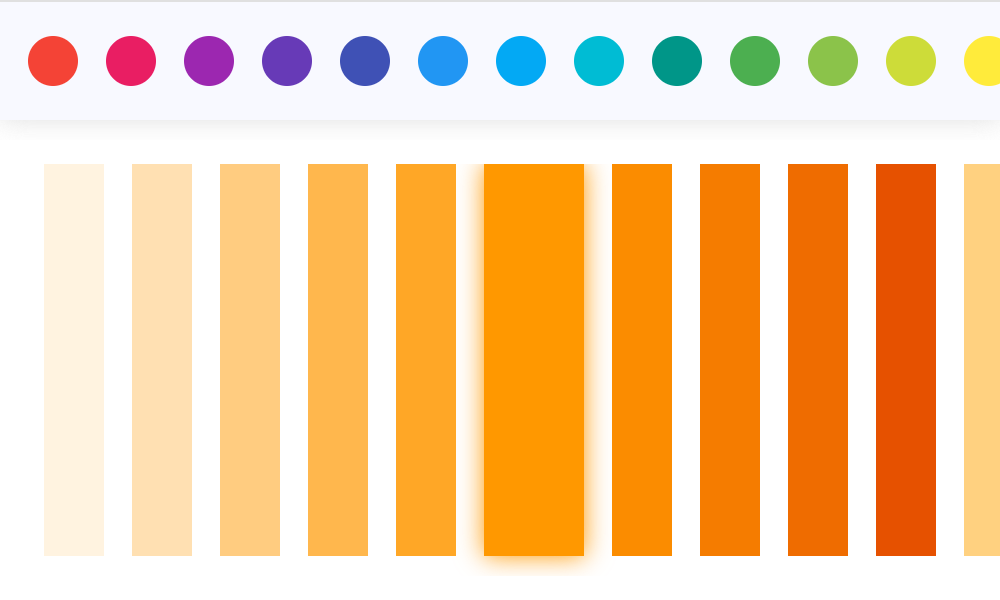
Basic MaterialPicker
Inherits: LayoutControl
Properties
-
color(Optional[ColorValue]) –The currently selected color.
-
enable_label(bool) –Whether to show color shade labels.
-
portrait_only(bool) –Whether to force portrait layout.
Events
-
on_color_change(Optional[ControlEventHandler[MaterialPicker]]) –Called when the picker color is changed.
-
on_primary_change(Optional[ControlEventHandler[MaterialPicker]]) –Called when the primary color is changed.
Example#
import flet as ft
from flet_color_pickers import MaterialPicker


def main(page: ft.Page):
    page.title = "MaterialPicker"
    page.padding = 20

    def on_color_change(e: ft.ControlEvent):
        print(f"color: {e.data}")

    def on_primary_change(e: ft.ControlEvent):
        print(f"primary: {e.data}")

    picker = MaterialPicker(
        color="#ff9800",
        on_color_change=on_color_change,
        on_primary_change=on_primary_change,
    )

    page.add(picker)


ft.run(main)
Properties#
class-attribute
instance-attribute
#
color: Optional[ColorValue] = None
The currently selected color.
class-attribute
instance-attribute
#
enable_label: bool = False
Whether to show color shade labels.
class-attribute
instance-attribute
#
portrait_only: bool = False
Whether to force portrait layout.
Events#
class-attribute
instance-attribute
#
on_color_change: Optional[
    ControlEventHandler[MaterialPicker]
] = None
Called when the picker color is changed.
The data property of the event handler argument contains
the color value as a hex string.
class-attribute
instance-attribute
#
on_primary_change: Optional[
    ControlEventHandler[MaterialPicker]
] = None
Called when the primary color is changed.
The data property of the event handler argument contains
the color value as a hex string.